Subscribe to get notified about product launches, special offers and news
Ship direct to your remote teams in the Philippines. UK, EU, USA, Canada, NZ & Australia—we’ve got you. Overseas companies are our top priority. Get started today.
We use cookies and similar technologies to run our site, improve performance, and for marketing. You can accept all cookies, reject non-essential cookies, or manage your preferences at any time. See our Privacy Policy for details.
Price Disclaimer and Key Notes
Please note that prices and availability of our products are subject to change without prior notice. Despite our best efforts to maintain accuracy, occasional errors may occur. In such cases, where a pricing discrepancy is identified, we will promptly notify you via chat, email, or phone. You will then have the option to accept the amended price or cancel your order. We highly recommend verifying stock availability and prices before proceeding with your payment. For credit card payments, please allow approximately six to eight business days for processing and clearance. Your understanding and cooperation in these matters are greatly appreciated. Shipment will occur within two to five business days following the clearance of payment. Please be aware that our primary focus is on Dell, HP & Lenovo business computers and servers. Accessories are typically available for purchase as part of a bundle or may be offered in larger quantities.
We're sorry to convey that we do not participate in government bids and won't be providing quotation requests.
Zum Zoomen über das Bild scrollenKlicke zum Zoomen auf das Bild
/
Beschreibung
Lenovo ThinkPad T14 Gen5 Ryzen 7 64gb 1TB 21MCS13K00 T14 Gen5 AMD Ryzen™ 7 PRO 8840U Processor (3.30 GHz up to 5.10 GHz)/64 GB DDR5-5600MT/s (SODIMM) - (2 x 32 GB)/1TB ssd/Qualcomm® Wi-Fi 6E NFA725A 2x2 AX & Bluetooth® 5.1 (Windows 10) or Bluetooth® 5.3 (Windows 11)/14" WUXGA (1920 x 1200), IPS, Anti-Glare, Non-Touch, 45%NTSC, 400 nits, 60Hz, 5MP RGB+IR with Privacy Shutter, Mic, Black/Win11 Pro 3Y PS 3/3/3
Unprecedented Productivity Anywhere, Everywhere
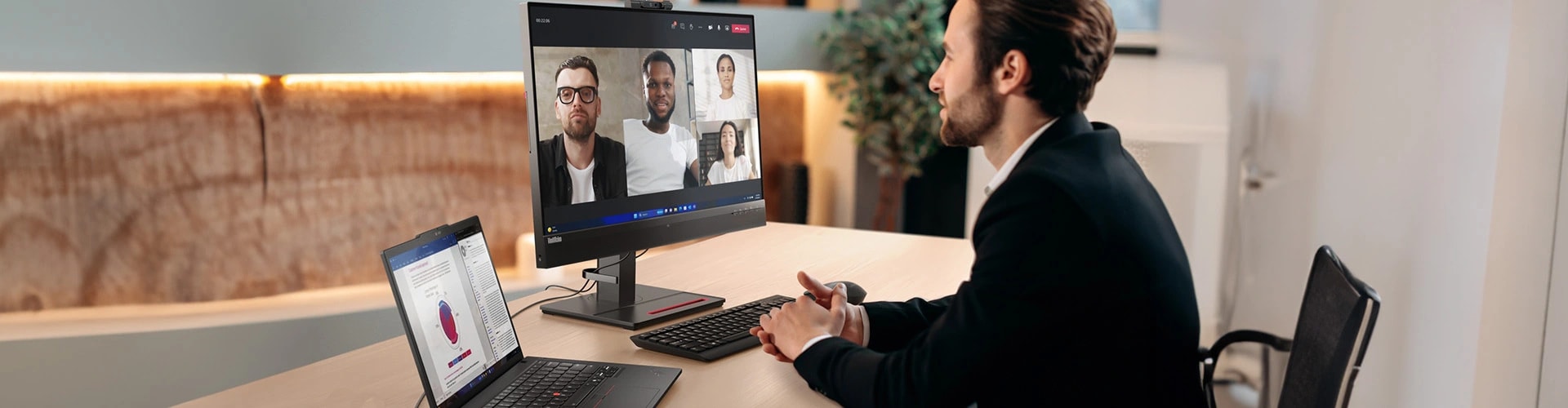
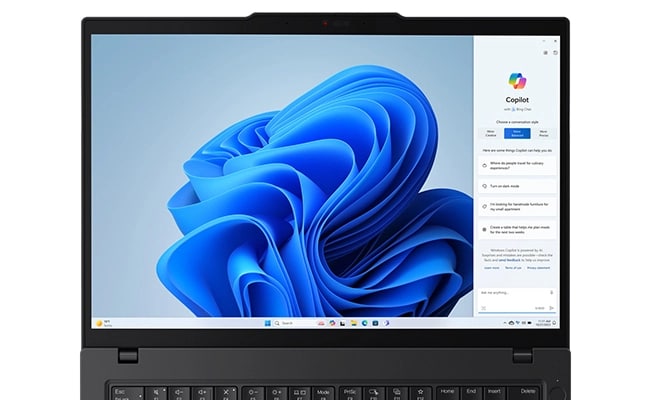
Explore amazing computing and power efficiency on the go with the 14″ ThinkPad T14 Gen 5 laptop, fueled by the AMD Ryzen™ PRO processor. Energize your creative work with vivid AMD Radeon™ graphics. Plus, enjoy AI-powered collaboration features like voice focus and automatic framing to boost your productivity and elevate your remote work experience.
A Display That Brightens Your Workday
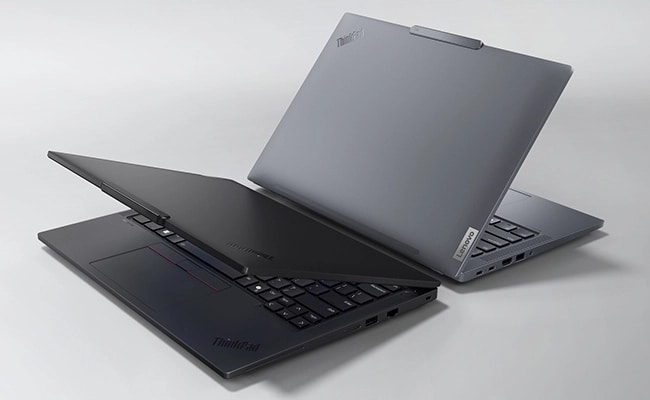
Bask in the pristine clarity of visuals on the T14 Gen 5 laptop with the 2.8K OLED display option and the 3M optical solutions boost brightness with power-saving luminance. A number of displays feature the choice of low blue-light-certification to prevent eye fatigue and strain. Plus, choose from elegant shades of Eclipse Black and Luna Grey.
More Confidence & Better Control
Our redesigned ThinkPad keyboard includes tactile markings for easy key recognition and an enlarged TrackPad (120mm / 4.72ʺ) for greater control. A double tap on the TrackPoint activates a Quick Menu for customizable settings. And the Communications Bar atop the screen boasts a 5MP camera and noise-canceling mics for a sharper audio-visual focus.
Intuitive Features, Impactful Design
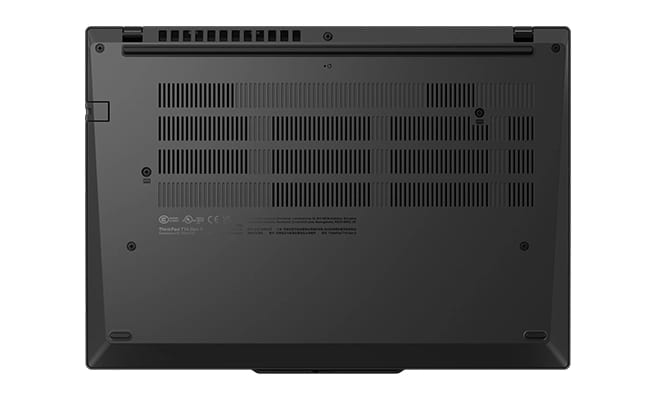
Stay productive all day with the T14 Gen 5 laptop, which seamlessly adapts to your workflow by adjusting battery usage. Its advanced thermal design features a dual-fan system with rear air vents for superior cooling. Plus, it's durability-tested to MIL-STD-810H specifications and promotes energy efficiency with an ENERGY STAR®8.0 certification.
Power to You With DIY Ease
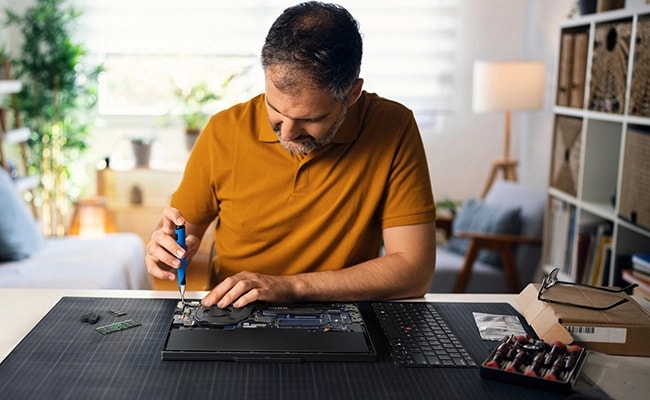
The ThinkPad T14 Gen 5 laptop offers long-lasting durability and allows for easy self-repairs with its customer replaceable units (CRU) — requiring no tech expertise. Its remarkable do-it-yourself capabilities are highlighted by a high 9.3/10 rating on the iFixit Repairability Scale to ensure effortless upgrades and component replacements.
State-of-the-art Security Solutions
Enjoy peace of mind with assured data security on the T14 Gen 5 laptop. With ThinkShield, our advanced security suite, your data is encrypted by a discrete Trusted Platform Module (dTPM). Biometrics provide extra security, from fingerprint reader to facial recognition login, while a webcam privacy shutter maintains visual privacy when needed.
Specifications may vary depending upon region / model.
Tech Specs
Performance
Processor
Up to AMD Ryzen™ 7 PRO 8840U featuring Ryzen™ AI
Operating System
Windows 11 Pro - Lenovo recommends Windows 11 Pro for business
Windows 11 Home
Ubuntu®Linux®
Graphics
AMD Radeon™ 780M
Memory
Up to 64GB DDR5, 2 x SODIMM (5600Mhz)
Storage
Up to 2TB M.2 PCIe Gen 4 x 4 SSD, 2280 compatible
Battery
52.5Whr (customer replaceable unit)
39.3Whr
Rapid Charge (60 minutes = 80% capacity) with 65W or higher adapter
Audio
2 x 2W speakers (user facing)
Dolby Audio™
Dolby Voice®
Dual-array mics
Camera
5MP RGB & infrared (IR) with webcam privacy shutter
5MP RGB with webcam privacy shutter
Connectivity
Ports/Slots
2 x USB-C®(USB4® 40Gbps)
2 x USB-A (USB 5Gbps)
Ethernet (RJ45)
HDMI®2.1 (supports resolution up to 4K@60Hz)
Headphone / mic combo
Optional: Nano SIM
Optional: Smart card reader
* USB port transfer speeds are approximate and depend on many factors, such as processing capability of host/peripheral devices, file attributes, system configuration and operating environments; actual speeds will vary and may be less than expected.
Wireless
Intel®WiFi 7
Intel®WiFi 6E*
5G sub-6 eSIM** (with Eclipse Black models)
4G LTE (CAT6 / CAT16) eSIM**
Bluetooth®5.3
* 6GHz WiFi 6E operation is dependent on the support of the operating system, routers/APs/gateways that support WiFi 6E, along with the regional regulatory certifications and spectrum allocation.
** Optional WWAN availability varies by region and must be configured at time of purchase; it requires a network service provider.
14" WUXGA (1920 x 1200) IPS, 400nit, 100% sRGB, antiglare, Eyesafe®-certified low blue light
Dimensions (H x W x D)
17.7mm x 315.9mm x 223.7mm / 0.70″ x 12.44″ x 8.81″
Weight
Starting at 1.30kg / 2.86lbs
Keyboard
Optional: Backlit with white LED lighting
Dual-function TrackPoint: navigate the cursor or double-tap to open TrackPoint Quick Menu
Spill-resistant
TrackPad with 3 buttons (120mm / 4.72")
ThinkPad TrackPoint Keyboard (1.5mm travel)
Color
Eclipse Black (recycled carbon fiber)
Luna Grey (recycled aluminum)
Sustainability
Material
90% post-consumer content (PCC) recycled plastic used in speaker enclosure
90% PCC recycled plastic used in battery enclosure
90% PCC recycled plastic used in adapter
85% PCC recycled plastic used in backlit keycaps
70% PCC plastic used in non-backlit keycaps
50% recycled aluminum used in top (A) cover in Luna Grey models
48% PCC recycled plastic used in display side (B)
45 % PCC recycled plastic used in bottom (D) cover with WWAN
30% PCC recycled plastic used in bottom (D) cover with WLAN
30% recycled carbon fiber used in top (A) cover in Eclipse Black models
100% plastic-free, recyclable packaging
Certifications / Registries
ENERGY STAR®8.0 certified
EPEAT®Gold, where applicable*
Eyesafe®- for low blue light
TCO 9.0
TÜV Rheinland for low blue light
*Visit www.epeat.net for registration status by country.
Other information
Security
Discrete Trusted Platform Module (dTPM) 2.0
Kensington®Nano Security Slot™
Microsoft Secured-core PCs
PrivacyGuard (dependent on display option)
Self-healing BIOS
Smart Power On: match-on-chip (MOC) fingerprint reader integrated with power button
Zero-touch login with Microsoft Windows Hello (requires optional IR camera)
Preloaded Software
Lenovo Commercial Vantage
Lenovo View
Office 365 (trial)
ThinkPad TrackPoint Quick Menu
Customer Replaceable Units (CRU)
Memory
52.5Whr battery
Solid state drive (SSD)
Keyboard
WWAN (antenna must be configured at time of purchase)
What’s in the Box
ThinkPad T14 Gen 5 (14″ AMD) laptop
USB-C®65W AC adapter, slim tip or USB-C®(supports Rapid Charge)
Quick Start Guide
Specifications may vary depending upon region / model.
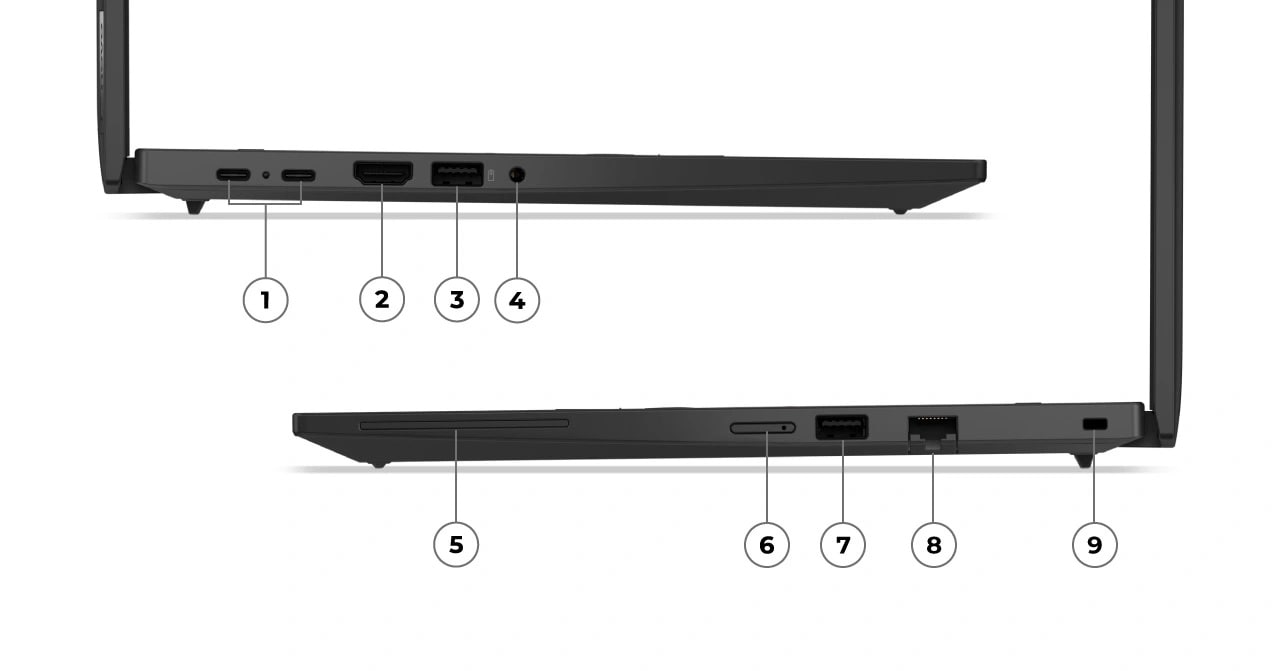
Ports & Slots
1
2 x USB-C® (USB4® 40Gbps)
2
HDMI® 2.1 (supports resolution up to 4K@60Hz)
3
USB-A (USB 5Gbps)
4
Headphone / mic combo
5
Optional Smart card reader
6
Optional Nano SIM
7
USB-A (USB 5Gbps)
8
Ethernet (RJ45)
9
Kensington Nano Security Slot™
Reviews
Rating Snapshot
Select a row below to filter reviews.
5 starsstars
105
105 reviews with 5 stars.
4 starsstars
20
20 reviews with 4 stars.
3 starsstars
7
7 reviews with 3 stars.
2 starsstars
7
7 reviews with 2 stars.
1 starstars
4
4 reviews with 1 star.
Overall Rating
4.5
143 Reviews
Average Customer Ratings
Performance
Performance, 3.7 out of 5
3.7
Features
Features, 4.5 out of 5
4.5
Value
Value, 4.0 out of 5
4.0
Reliability
Reliability, 4.0 out of 5
4.0
Customer Images and Videos
Filter Reviews
satisfaction
price
speed
for business use
performance
purchase
display
amd
Rating
What is the Primary Use of this Product?
Locale
1 to 8 of 143 Reviews
1–8 of 143Reviews
Sort by
Most Relevant
2 out of 5 stars.
Good laptop but faulty wifi card made it unusable
a year ago
It's a shame. I liked this laptop, esp. the build and feel of it. I ordered a custom version with a 1TB ssd, 2x8 GB ram, and the new Qualcomm 7 wifi card. Unfortunately, the wifi card was bad or something. I reset the laptop multiple times and it couldn't go over 100 kbps download speed. The laptop is practically unusable in this state. I couldn't even download different programs to use the laptop in an offline manner. I used the ethernet to debug stuff but I think it's just an issue with the qualcomm chip. I'll probably order the same T14 laptop again with different chipsets to avoid the issue. Be wary of the wifi card; qualcomm may have some QA problems
What is the Primary Use of this Product?Work
Received an incentive:No
Originally posted on lenovo.com
Response from lenovo.com:
a year ago
Customer Service
Thank you for taking time to provide feedback on your experience with our Lenovo product. We apologize for the inconvenience caused. Thank you for bringing this to our attention. We will be sure to pass your suggestion onto our concern team for their consideration as we move forward. Thanks again. Sincerely, Poornima_Lenovo
3 out of 5 stars.
A sweet and sour taste in the mouth
a year ago
The computer has a very robust chassis and pleasant to the touch, but I feel dissatisfied with the configuration that I opted for in my case a Six-core Raisen Pro 5 processor 12 Threads with 16 gigabytes of RAM since these are not enough to be able to easily run virtual machines, Even when increasing the ran memory to 64gb, the team can not with virtual machines. without a doubt a shame, I hoped that the processor would at least promise the battery saving that should be due to its optimization, but this is still like any other average laptop that gives you four hours of autonomy, considering that it works on a safety margin for the battery between 20 and 80%
What is the Primary Use of this Product?Work
Received an incentive:No
No, I do not recommend this product.
Originally posted on lenovo.com
Response from lenovo.com:
a year ago
Customer Service
Thank you for taking time to provide feedback on your experience with our Lenovo product. We apologize for the inconvenience caused. We are sorry to hear that your experience with our Lenovo product has not met your expectations. We are always trying to improve our Lenovo product to provide you with a better experience. We will be sure to pass your suggestion onto our concern team for their consideration as we move forward. Thanks again. Sincerely, Poornima_Lenovo
5 out of 5 stars.
Thinkpads just work
a year ago
(This review was collected as part of a promotion.) Generally I love the small compact design of this laptop. I bought this one to be a backup cause I had an ASUS I bought 1 year ago that had multiple faults to the point where I didn't trust it anymore. This Thinkpad, while the design is standard, feels more robust and it's at a price point that I don't feel bad for abusing it. The integrated graphics are powerful enough for video encodes. Battery life is phenomenal on low power mode. I'm running Fedora Linux and I boot windows 2go off an external nvme through the usb port. Would probably get another easily if I needed to. We'll see how it holds up over time.
What is the Primary Use of this Product?Work
Yes, I recommend this product.
Originally posted on lenovo.com
5 out of 5 stars.
Reliable Powerhouse for Cybersecurity & Cloud
7 months ago
[This review was collected as part of a promotion.] I purchased the ThinkPad T14 Gen 5 AMD for my cybersecurity and cloud computing training, and it’s been an absolute workhorse. The AMD performance is excellent — it handles virtualization, VirtualBox labs, and multitasking with ease, all while staying cool and responsive. The legendary ThinkPad keyboard makes long study sessions comfortable, and the 14” display strikes a great balance between portability and screen space. If I had to point out one small drawback, the speakers could be a bit louder, but with headphones this isn’t an issue.Overall, this machine has exceeded my expectations. It’s reliable, powerful, and perfect for anyone balancing professional tasks with technical training.
What is the Primary Use of this Product?School
Yes, I recommend this product.
Originally posted on lenovo.com
2 out of 5 stars.
T14 AMD Gen 5 and Gen 7
a year ago
Thinkpad has always been my work partner for more than 30 years. However, my recent purchases were not satisfactory. T14 AMD Gen 7 and Gen 5 were below my expectations. I experienced robotic sounds on and off (Gen 5); for Gen 7 - malfunctioning track pad, slow boot up and shutting down, apps were lagging, slow overall. Hope ThinkPad can redeem its reputation. Thank you.
[This review was collected as part of a promotion.] With about a month of use, my new ThinkPad T14 Gen 5 AMD has been excellent, so far. Fit and finish are perfect, all components work well, the keyboard and display are top notch, the sound is good with wireless and wired networking quite good. Running Linux (Slackware 15.0-current and Linux Mint 22.1) and everything just works and works well and fast - very happy. I still miss the older ThinkPad activity lights, but have installed some Linux tools/applets that provide similar functionality. The functionality, feature set and price make the ThinkPad T14 Gen 5 AMD a very good value, IMHO.
What is the Primary Use of this Product?Browsing/Streaming
Yes, I recommend this product.
Originally posted on lenovo.com
5 out of 5 stars.
Reliable Workhorse for the Modern Professional
11 months ago
(This review was collected as part of a promotion.) I was in the market for a new laptop to replace my aging one and naturally turned to Lenovo, having had good experiences with their laptops in the past. After doing some research and speaking with former colleagues, the ThinkPad T14 came highly recommended. Since my new job follows a BYOD (Bring Your Own Device) policy, I needed a dependable, business-grade laptop. The T14 has proven to be just that — it's packed with solid features, runs smoothly, and strikes a great balance between performance and portability. It’s exactly what I needed for work and has fully met my expectations.
What is the Primary Use of this Product?Work
Yes, I recommend this product.
Originally posted on lenovo.com
1 out of 5 stars.
Keyboard stops typing even after depot repair
5 months ago
(This review was collected as part of a promotion.) I would not recommend this laptop because the built-in keyboard randomly stops working for no obvious reason. It is very inconvenient. Despite the Lenovo depot taking a look my computer and replacing the hardware, the same issue persists. Nothing I do works to fix the problem including ensuring firmware is up to date (and as mentioned even the depot couldn't fix it). On that alone, this laptop is not worth the premium price. Imagine you are trying to get work done and your keyboard just stops working and the only way to restore function is to (temporarily until the next time it happens) is to restart your computer. This is unbelievably inconvenient and frustrating when trying to get important work done.
What is the Primary Use of this Product?School
No, I do not recommend this product.
Originally posted on lenovo.com
Response from lenovo.com:
5 months ago
Lenovo
Hi,\nThank you for sharing your feedback on the ThinkPad T14 Gen 5 and we're sorry to hear about the issues you've facing with the built in keyboard. We understand how frustrating it must be when the keyboard stops working unexpectedly impacting productivity. Your feedback is invaluable in highlighting areas where we need to improve both product reliability and service effectiveness. We recommend you contact our customer support to check for a replacement or return. We're committed to ensuring your satisfaction and appreciate your patience as we work to resolve this matter.\n\nRegards,\nThomas, Lenovo
1–8 of 143Reviews
Zum Zoomen über das Bild scrollenKlicke zum Zoomen auf das Bild
/
You may also like
Recently viewed
Nationwide Shipping Coverage
Secure packing: Every laptop is double-boxed and crated in a wooden box for safe transport.
Your choice of courier: We can ship via LBC Express or Southseas Cargo, or you may arrange your own forwarder/courier—we’ll coordinate pickup and provide full packing details.
Nationwide coverage: From Metro Manila to provincial and island destinations, with tracking and delivery updates.
Satisfaction Guaranteed
Proven track record: We’ve been serving business clients for 10+ years.
See for yourself: Browse our Client List and check our Google Reviews to hear directly from customers.
We stand behind every order: Clear communication, verified hardware, and responsive after-sales support.
Top-notch Support
Standard 3-Year Coverage: Every business computer includes 3-Year Next Business Day Onsite Support with hardware coverage.
Brand-Direct Service: Support is handled directly by the manufacturer (Dell/HP/Lenovo), so only brand-trained, certified engineers and technicians are deployed.
Fast, Onsite Response: Issues are diagnosed remotely and, when needed, a technician arrives next business day with the required parts.
Secure payments
We accept major credit and debit cards and bank transfers (domestic or international).
To protect our customers and prevent fraud, card payments are not automated at checkout.
After you place an order, we manually verify the items and order details, then send a secure payment link for card payment.
Bank transfers are available for faster processing and corporate procurement workflows.
Your order isn’t charged or placed until verification is complete.
Customer logos are trademarks of their respective owners and used for identification only. No endorsement implied. To request removal, email support@benson.ph.