
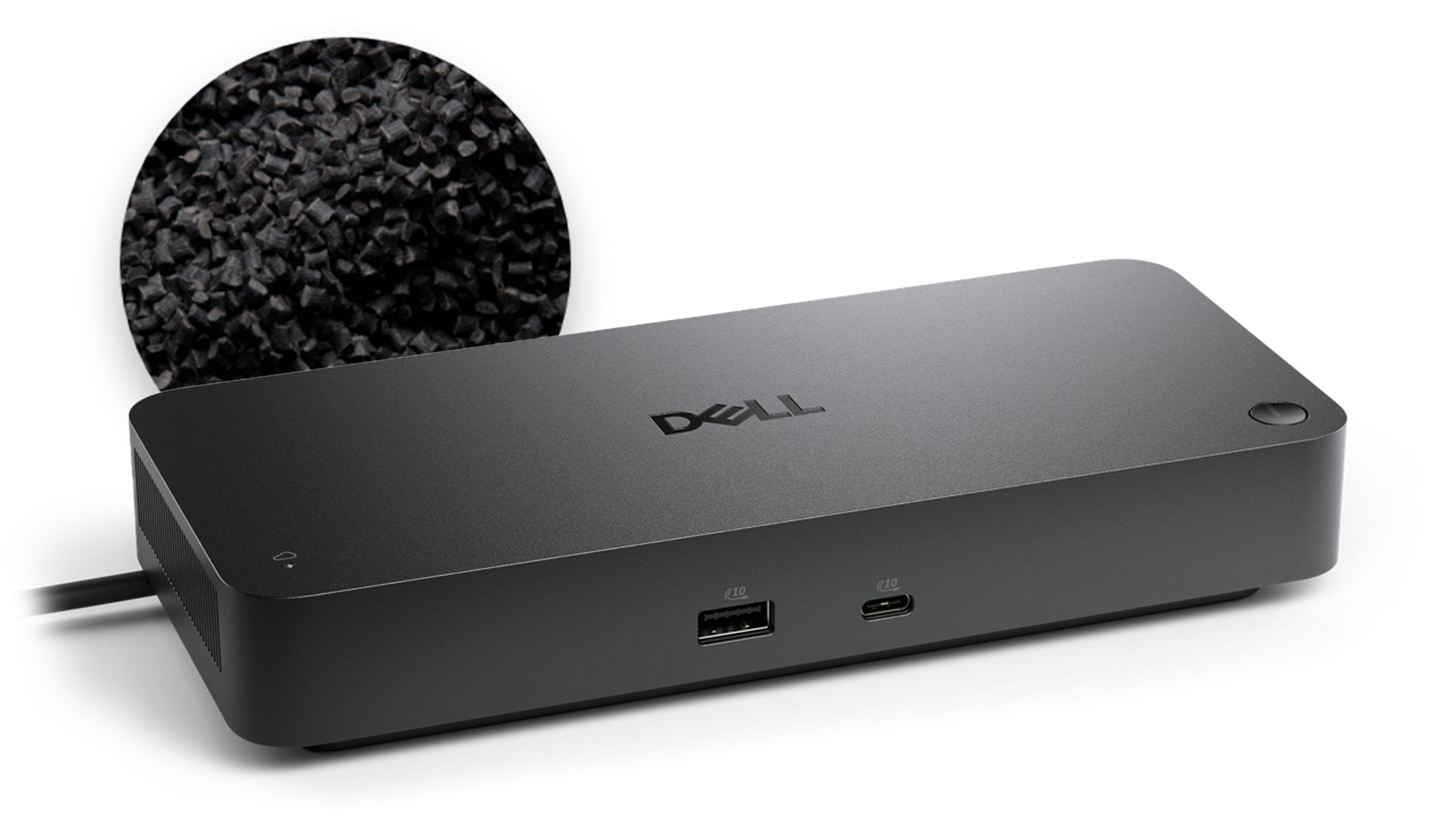

Dell Pro Thunderbolt 4 Smart Dock - SD25TB4: Hands-on Review
"Offering excellent expansion capabilities, this dock helps users do it all." — StorageReview
Please note that prices and availability of our products are subject to change without prior notice. Despite our best efforts to maintain accuracy, occasional errors may occur. In such cases, where a pricing discrepancy is identified, we will promptly notify you via chat, email, or phone. You will then have the option to accept the amended price or cancel your order.
We highly recommend verifying stock availability and prices before proceeding with your payment. For credit card payments, please allow approximately six to eight business days for processing and clearance. Your understanding and cooperation in these matters are greatly appreciated. Shipment will occur within two to five business days following the clearance of payment. Please be aware that our primary focus is on Dell, HP & Lenovo business computers and servers. Accessories are typically available for purchase as part of a bundle or may be offered in larger quantities.
We're sorry to convey that we do not participate in government bids and won't be providing quotation requests.


How easy is it to learn about this product?Rating is from 1-7, 1 being Very Difficult and 7 being Very Easy
Reviews
Verified
Dell Promotion
The Dell Pro Thunderbolt 4 Smart Dock (SD25TB4) has been an excellent addition to my office setup. I use it daily for work, and it significantly simplifies connecting my laptop to all of my peripherals. With a single Thunderbolt cable, I'm able to connect power, dual monitors, keyboard, mouse, Ethernet, and other accessories instantly. This one-cable setup makes docking and undocking my laptop fast and seamless, which is especially helpful when moving between meetings or working in different locations. The dock feels solid and well-built, and connectivity has been very reliable. Displays connect consistently, network performance is stable, and the dock delivers sufficient power to keep my laptop charged throughout the day. The Thunderbolt 4 performance provides fast data transfer and smooth multi-monitor support without issues. Overall, the Dell Pro Thunderbolt 4 Smart Dock is a dependable, high-quality docking solution for a professional office environment. It streamlines my workspace, reduces cable clutter, and makes connecting to my laptop effortless. I would highly recommend it to anyone looking for a reliable, enterprise-grade dock for daily work use.
Response from Dell
Dear Valued Customer, Thank you for sharing such a detailed and thoughtful review of the Dell Pro Thunderbolt 4 Smart Dock (SD25TB4). We are delighted to hear how well it integrates into your office setup and simplifies your daily workflow. This dock is engineered to deliver stable power, seamless multi‑monitor handling, and fast data transfer, all through a single cable designed for modern productivity. It is great to know that the build quality, reliability, and Thunderbolt 4 performance are supporting your work environment effectively. If you ever need assistance or want to explore more ways to get the most out of your Dell accessories, our Dell US Technical support team is always here to help: https://url.dell.com/9b5810. Thank you for choosing a docking solution built for professional efficiency. -Surabhi
Verified
Dell Promotion
#sweepstakes All Dell products are amazing and I stand by them to the end of my days in IT. These docking stations are very reliable. Thanks very much for sending over to OEC!
Response from Dell
Dear Valued Customer, Thank you for your review of the Dell Pro Thunderbolt 4 Smart Dock. We are glad to hear that it has been reliable and supports your IT needs effectively. This dock is engineered for strong connectivity, consistent power delivery, and dependable multi‑device support for modern workplaces. If you ever need assistance or want to explore more ways to get the most out of your Dell accessories, our Dell US Technical support team is always here to help: https://url.dell.com/9b5810. Your long‑standing support for Dell products is sincerely appreciated. -Surabhi
Verified
Dell Promotion
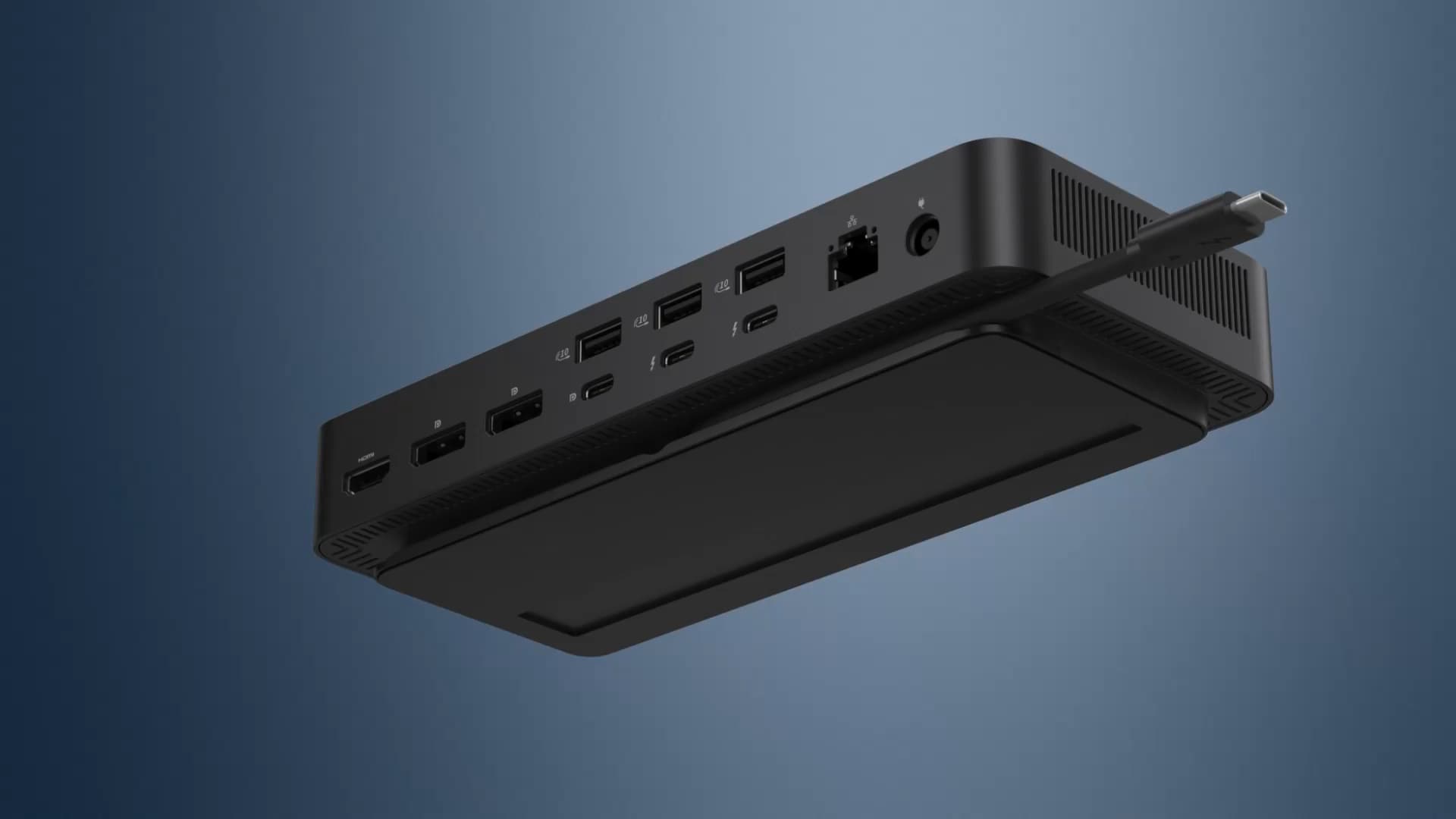
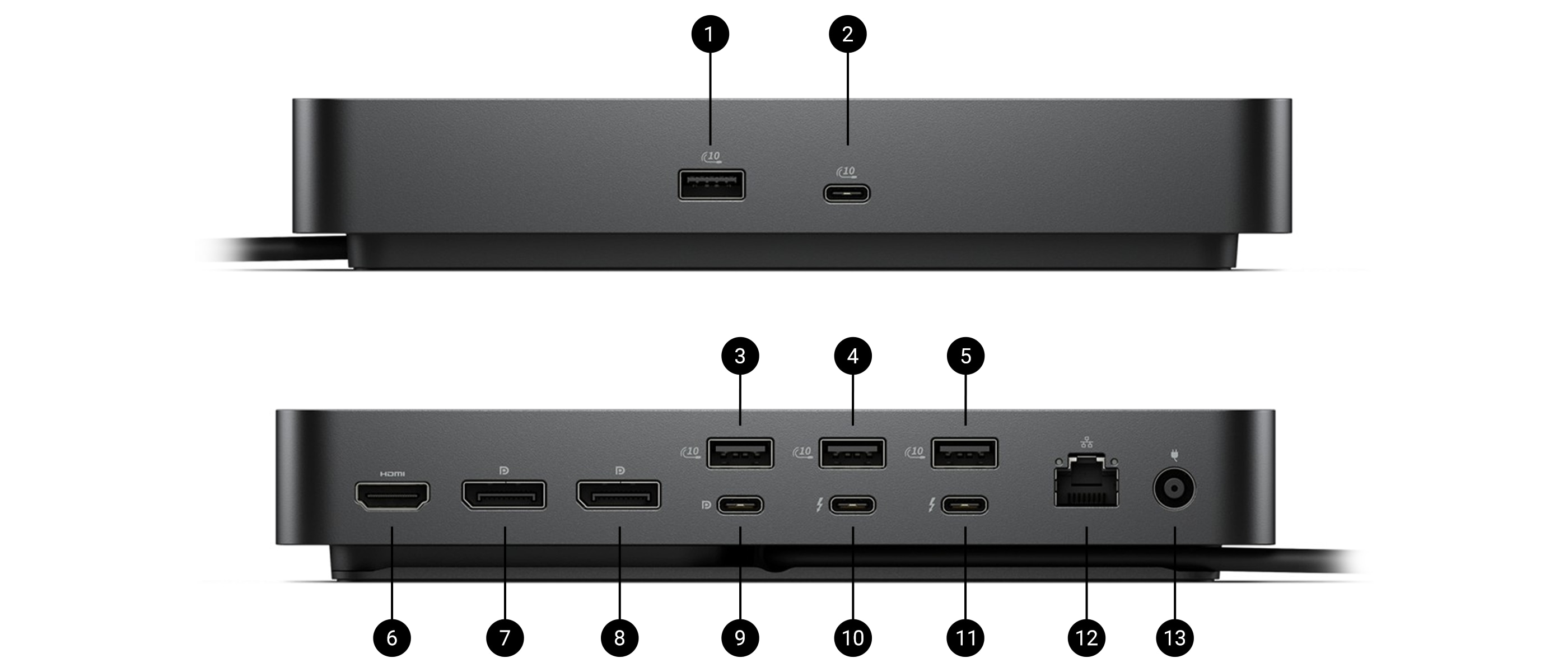
I absolutely love the Dell Pro Thunderbolt 4 Smart Dock — it's been a game-changer for my workstation. The port selection is phenomenal: dual Thunderbolt 4 ports, multiple USB-A and USB-C ports, HDMI 2.1, two DisplayPort 1.4 outputs, and a fast 2.5 GbE Ethernet jack mean I never have to hunt for adapters or hubs. It supports multiple high-resolution displays simultaneously and keeps all my peripherals and devices connected with ease. Plus, with powerful charging and smart management features, it's perfect for a clutter-free, professional setup.
Response from Dell
Dear Valued Customer, Thank you for your review on the Dell Pro Thunderbolt 4 Smart Dock! We’re thrilled it’s a game-changer for your workstation and that its port selection meets your needs. This dock is designed for seamless connectivity and efficient power delivery. If you ever need assistance or want to explore more ways to get the most out of your Dell accessories, our Dell US Technical support team is always here to help: https://url.dell.com/9b5810. Thank you for being a part of the Dell community. -Surabhi
Verified
Dell Promotion
The Dell Pro Thunderbolt 4 Smart Dock - SD25TB4 is the perfect companion for any Dell Pro Max laptop with Thunderbolt 4 ports. With its multi-monitor capabilities, professionals, enthusiasts, and power users can benefit from using this robust, well-designed dock. It features up to 130W of power delivery for Dell systems, and 96W for non-Dell devices. The built-in 2.5GbE RJ45 keeps connectivity neat and simple while offering 2x Display Port 1.4, 1x HDMI 2.1, 1x USB-C 3.2 Gen2 multifunction Display Port 1.4 to transform your laptop into a great desktop in seconds. It can handle upto 4x 4K (3840x2160) @ 60Hz, 3x 4K (3840x2160) @ 60Hz, 2 x 6K (6144 x 3456) @ 60Hz, and 1 x 8K (7680 x 4320) @ 60Hz. It has excellent device expansion ports: 2x Thunderbolt 4 USB-C ports with up to 40Gbps transfer speeds, and 4x USB 3.2 Gen 2 Type-A with 10Gbps transfer speeds. The best part is that the OS compatibility is not restricted to Windows 10 or 11 only. It can work with Ubuntu 24.04 or newer, Red Hat Enterprise Linux, macOS, and even ChromeOS. My only gripe is that the input Thunderbolt 4 cable is built in and non-replaceable. However, it is long enough if you position the device on your desk strategically. Overall, the Dell Pro Thunderbolt 4 Smart Dock - SD25TB4 is the perfect companion for anyone who wishes to transform their mobile device into a desktop with more than sufficient connectivity options, and I highly recommend it.
Response from Dell
Dear Valued Customer, Thank you for your detailed review on the Dell Pro Thunderbolt 4 Smart Dock! We’re delighted to hear it’s the perfect companion for your Dell Pro Max laptop and that its multi-monitor capabilities and connectivity options impressed you. This dock is designed to transform your laptop into a powerful desktop setup in seconds. If you ever need assistance or want to explore more ways to get the most out of your Dell accessories, our Dell US Technical support team is always here to help: https://url.dell.com/9b5810. We appreciate your trust in Dell and look forward to continuing to support your success. -Surabhi
Verified
Dell Promotion
Quick and easy to set up for your at home work station. I have my Dell monitor plugged in and it all connects to my computer seamlessly. Not to mention its very light weight and cool design!
Response from Dell
Dear Valued Customer, Thank you for your review of the Dell Pro Thunderbolt 4 Smart Dock! We’re delighted that its seamless connectivity and lightweight design have made your home office setup easier. Dell docks are built to simplify workflows and enhance productivity. If you ever need assistance or want to explore more ways to get the most out of your Dell accessories, our Dell US Technical support team is always here to help: https://url.dell.com/9b5810. We appreciate your confidence in Dell and look forward to supporting your success. –Surabhi
Verified
Dell Promotion
Docking stations are a must in my business and Dell has never disappointed us.
Response from Dell
Dear Valued Customer, Thank you for your review on the Dell Pro Thunderbolt 4 Smart Dock SD25TB4. We are glad to hear Dell docking solutions continue to meet your business needs without disappointment. Designed for seamless connectivity, this dock supports efficient multi‑device workflows. If you ever need assistance or want to explore more ways to get the most out of your Dell accessories, our Dell US Technical Support team is always here to help: https://url.dell.com/9b5810. We appreciate your confidence in Dell business accessories. -Surabhi
Verified
Dell Promotion
Its very handy to dock the laptop using this vs all the cables for the devices. One cable that charges and connects all devices. Everything plugged into it works fine. #sweepstakes
Response from Dell
Dear Valued Customer, Thank you for your positive feedback on the Dell Pro Thunderbolt 4 Smart Dock - SD25TB4. We are glad to hear that the single‑cable design has simplified your setup by powering and connecting all your devices at once. Designed for efficiency and flexibility, this dock helps reduce cable clutter while ensuring stable connectivity for all connected peripherals. If you ever need assistance or want to explore more ways to get the most out of your Dell accessories, our Dell US Technical Support team is always here to help: https://url.dell.com/9b5810. We appreciate you choosing Dell to create a more streamlined workspace. -Surabhi
Verified
The compact size of the docking station fits perfectly on our desks. Access to the ports is quick and easy.
Response from Dell
Dear Valued Customer, Thank you for your feedback on the Dell Pro Thunderbolt 4 Smart Dock. We are pleased to hear that its compact design and easy port access fit perfectly into your office setup. This dock is designed to streamline connectivity while keeping desks efficient and organized. If you ever need assistance or want to explore more ways to get the most out of your Dell accessories, our Dell US Technical support team is always here to help: https://url.dell.com/9b5810. We appreciate Dell being part of your workspace solutions. -Surabhi
Verified
Dell Promotion
These docks have serviced us well, absolutely no issues and they support our multiple monitor users easily. Would recommend this model, and we will be making this our standard.
Response from Dell
Dear Valued Customer, Thank you for your positive review of the Dell Pro Thunderbolt 4 Smart Dock SD25TB4. We are happy to hear it reliably supports multiple monitors and has become your standard choice. Designed for modern offices, this dock delivers stable connectivity and simplifies multi‑display work environments. If you ever need assistance or want to explore more ways to get the most out of your Dell accessories, our Dell US Technical Support team is always here to help: https://url.dell.com/9b5810. We appreciate your trust in Dell solutions for your organization. -Surabhi
Verified
Dell Promotion
The Dell Pro Thunderbolt 4 Smart Dock is the most reliable USB-C docking station around. It connects immediately and peripheral devices are very responsive. The available USB-C and USB-A on the front are a convenient addition. My only complaint would be that the dock could use additional ports on the back, as some users connect more peripherals then the available ports. #sweepstakes
Response from Dell
Dear Valued Customer, Thank you for your thoughtful feedback on the Dell Pro Thunderbolt 4 Smart Dock - SD25TB4. We’re glad to hear it delivers fast connections and responsive peripherals while maintaining excellent reliability. We also appreciate your suggestion regarding additional rear ports, as feedback like yours helps influence future design improvements. If you ever need assistance or want to explore more ways to get the most out of your Dell accessories, our Dell US Technical support team is always here to help: https://url.dell.com/9b5810. Your insights help us continue refining professional‑grade solutions. -Surabhi