
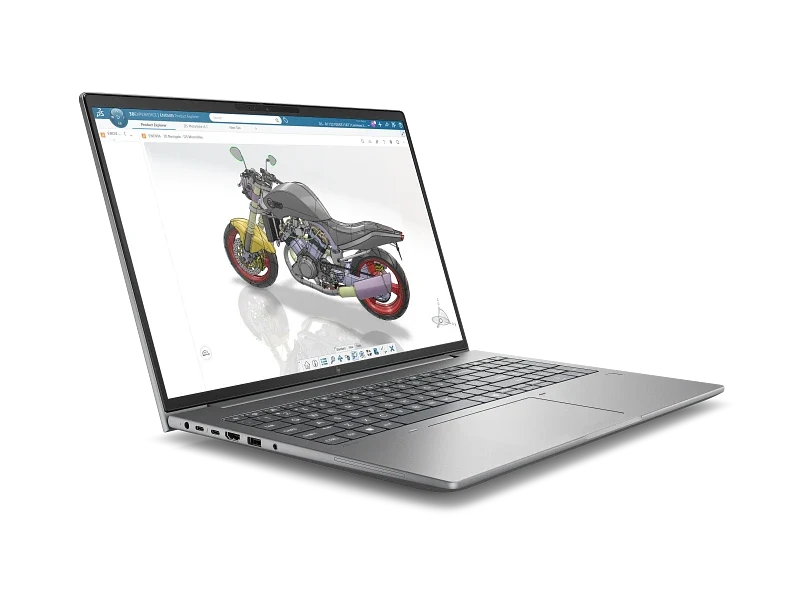
HP ZBook X G2i 16: A Serious Mobile Workstation for Demanding Professionals
Intel Core Ultra 9, 64GB DDR5 RAM, and NVIDIA RTX PRO 2000 Graphics — Is This the Kind of Workstation You Actually Need?
Not everyone needs a workstation. For most office users, a decent business laptop with 16GB of memory and a modern processor is more than enough to get through the working day.
But there are jobs where an ordinary laptop, even an expensive one, simply isn't the right tool.
Think of architects working with large building models, engineers running complex CAD assemblies, or designers handling demanding 3D projects. These professionals need more than a fast processor. They need a machine designed to handle demanding applications, substantial memory requirements, and graphics workloads without constantly running into hardware limitations.
This is where the HP ZBook X G2i 16-inch Mobile Workstation comes into the picture.
The configuration we're looking at, HP DR1N6PT, comes with an Intel Core Ultra 9 386H processor, 64GB DDR5 memory, a 1TB NVMe SSD, and NVIDIA RTX PRO 2000 graphics with 8GB of dedicated video memory.
On paper, that's a fairly serious combination. But specifications alone don't tell the whole story.
A Workstation, Not Just Another High-End Laptop
There's a tendency to compare workstations with gaming laptops because both can offer powerful processors and dedicated graphics cards.
It's a reasonable comparison, particularly when gaming laptops sometimes appear to offer more graphics performance for less money.
However, they're built with different priorities.
Gaming laptops are generally optimized for gaming performance, while professional mobile workstations place greater emphasis on compatibility with specialized software, professional graphics drivers, enterprise management, and long-term business use.
For someone working primarily with AutoCAD, Revit, SolidWorks, or other professional applications, these differences can matter.
That's not to say a gaming laptop cannot run engineering or design software. Many certainly can. The question is whether it makes sense to rely on one for work where software stability, vendor support, and compatibility are important.
The ZBook X G2i is aimed at professionals who would rather have a purpose-built workstation than adapt a consumer laptop to their requirements.
Intel Core Ultra 9 386H: Processing Power for More Than Everyday Computing
At the center of this configuration is Intel's Core Ultra 9 386H processor.
For typical office applications, a processor in this class would be more than most users need. Its real value becomes more apparent when handling workloads involving complex calculations, multitasking, large datasets, and demanding professional software.
Engineering and architectural applications can be particularly challenging because their performance requirements vary considerably.
Some operations depend heavily on individual CPU cores, while rendering, simulation, and other computational tasks may take advantage of multiple cores.
A capable processor is therefore important, but it should never be the only consideration when choosing a workstation.
The amount of memory, graphics hardware, storage performance, and the specific software being used can be just as important.
This is one reason we generally recommend looking at the actual workload before deciding on a workstation configuration.
64GB DDR5 Memory: A Sensible Starting Point for Heavy Workloads
One specification that stands out is the 64GB of DDR5 memory.
For ordinary office work, 64GB would be excessive. But for professional applications, having sufficient memory can make a significant difference.
Consider an architect working on a large Revit project while keeping several reference drawings, PDF documents, spreadsheets, and browser windows open.
Or an engineer switching between CAD software, simulation tools, and other supporting applications.
These workloads can consume substantial amounts of system memory.
When available RAM becomes insufficient, Windows may begin relying more heavily on virtual memory stored on the SSD. Although modern NVMe drives are fast, they are still considerably slower than physical RAM.
Having 64GB available gives professionals more room to work with larger projects and multiple applications simultaneously.
Of course, not everyone needs this much memory. A smaller configuration may be perfectly adequate for less demanding work.
But for buyers already considering a professional workstation, 64GB is a reasonable capacity to evaluate, particularly if the machine is expected to remain in service for several years.
NVIDIA RTX PRO 2000 8GB: Graphics Designed for Professional Work
Perhaps the most important distinction between this ZBook and a conventional business laptop is its dedicated graphics processor.
The NVIDIA RTX PRO 2000 with 8GB of dedicated graphics memory is designed for professional visualization and GPU-accelerated workloads.
Unlike integrated graphics, which share system memory, the dedicated GPU has its own video memory for handling graphics-related tasks.
This can be particularly useful when working with complex 3D models, detailed assemblies, and graphics-intensive applications.
Potential applications include:
-
Architecture and construction: Working with detailed building models, 3D visualization, and BIM applications.
-
Mechanical engineering: Handling CAD assemblies, product designs, and technical visualization.
-
Product design: Developing and reviewing complex 3D models.
-
Media production: Supporting GPU-accelerated editing and creative workflows.
-
Scientific and technical computing: Running compatible applications that can take advantage of GPU acceleration.
One important point worth mentioning is that an RTX PRO graphics card should not automatically be judged by the same standards as a gaming GPU.
Professional graphics solutions are intended for a different market, where driver support and application compatibility can be particularly valuable.
That said, buyers should still verify the graphics requirements of their software.
An RTX PRO 2000 may be an appropriate choice for many professional workloads, but particularly demanding rendering, simulation, or AI applications may require a more powerful GPU or additional video memory.
The right graphics card depends on the work being performed, not simply the model number.
1TB NVMe SSD: Fast Storage, But Capacity Still Matters
This configuration includes a 1TB PCIe NVMe solid-state drive.
For most professional users, NVMe storage offers a noticeable improvement over older hard drives, particularly when starting Windows, launching applications, and opening project files.
A 1TB drive also provides a reasonable amount of space for the operating system, professional software, and active projects.
However, storage requirements vary considerably.
Someone working mainly with CAD drawings and office documents may find 1TB sufficient.
A video editor handling high-resolution footage or a designer maintaining large rendering libraries could fill that capacity much sooner.
For organizations purchasing workstations for long-term deployment, it's worth reviewing storage requirements alongside backup and file-management arrangements.
Fast local storage is useful, but it shouldn't replace a proper backup strategy.
Why Windows 11 Pro Makes Sense Here
The ZBook X G2i comes with Windows 11 Pro 64-bit.
For a workstation intended for business use, the Pro edition is a practical choice.
It includes capabilities such as domain joining, BitLocker drive encryption, Remote Desktop hosting, and business management features that may be important in a corporate environment.
These are not necessarily features every individual user will need.
But for companies managing multiple computers, especially those with centralized IT administration, Windows 11 Pro is generally a more appropriate choice than the Home edition.
It also makes the workstation easier to integrate into an existing business IT environment.
The Importance of Warranty and After-Sales Support
One aspect of workstation purchasing that often receives less attention than processor speed or graphics performance is warranty coverage.
This particular HP configuration is listed with a 1-1-1 base warranty and a three-year onsite warranty upgrade.
For a business, warranty support is more than an added convenience.
A workstation may contain important project files, specialized software installations, and configurations that take time to reproduce.
If the machine develops a hardware problem, the resulting downtime can be far more expensive than the repair itself.
Onsite warranty coverage can be particularly valuable for organizations that do not have the time or resources to bring equipment to a service center.
Naturally, the exact coverage, response times, and service conditions should be confirmed before purchasing.
For companies planning to use their workstations over several years, warranty support deserves serious consideration.
Is the HP ZBook X G2i Right for Everyone?
Probably not.
And that's an important distinction.
If the primary workload consists of Microsoft Office, email, web browsing, accounting applications, and occasional image editing, a conventional business laptop would likely be a more economical choice.
There's little reason to pay for workstation-class hardware if the applications being used cannot take meaningful advantage of it.
On the other hand, professionals who regularly work with complex 3D models, engineering software, large datasets, or demanding creative applications have different requirements.
For these users, the combination of a Core Ultra 9 processor, 64GB RAM, and dedicated NVIDIA RTX PRO graphics makes the ZBook X G2i worth considering.
Even then, we wouldn't recommend choosing a workstation based on specifications alone.
A machine that performs well in one professional application may not necessarily be the best choice for another.
Software requirements should always come first.
Our Thoughts
The HP ZBook X G2i 16-inch Mobile Workstation is an interesting option for professionals who need substantial computing power but still want the flexibility of a portable system.
The configuration we've discussed offers a capable processor, generous memory, dedicated professional graphics, and fast NVMe storage.
It's also equipped with Windows 11 Pro and an upgraded onsite warranty package, both of which make sense for business deployment.
There are, of course, questions that specifications alone cannot answer.
Actual application performance, thermal behavior under sustained workloads, battery life, display quality, and portability all deserve consideration when evaluating a mobile workstation.
Without hands-on testing, it would be premature to make definitive claims about those areas.
What we can say is that the hardware configuration makes this ZBook a credible candidate for professionals working with demanding engineering, design, and visualization applications.
Our advice? Don't buy a workstation simply because it has the fastest processor or the most expensive graphics card. Buy one that matches the software you use and the projects you actually work on.
A properly selected workstation can remain a productive tool for years. An incorrectly specified one, regardless of price, can become an expensive compromise.
HP ZBook X G2i 16-inch — Configuration Overview
| Component | Specification |
|---|---|
| Product | HP ZBook X G2i 16-inch Mobile Workstation |
| Product Code | DR1N6PT |
| Processor | Intel Core Ultra 9 386H |
| Memory | 64GB DDR5 RAM |
| Storage | 1TB PCIe NVMe SSD |
| Graphics | NVIDIA RTX PRO 2000 |
| Dedicated Graphics Memory | 8GB |
| Operating System | Windows 11 Pro 64-bit |
| Display Size | 16 inches |
| Base Warranty | 1-1-1 |
| Warranty Upgrade | 3-Year Onsite Warranty |
Specifications are based on the listed configuration and are subject to manufacturer confirmation. Warranty coverage and service terms may vary.
Looking for a Mobile Workstation?
Whether you're purchasing a single workstation for professional use or planning to deploy multiple systems across your organization, choosing the correct configuration is important.
We can assist in identifying suitable workstation options based on your applications, preferred specifications, and budget.
Contact our sales team for product availability, pricing, and configuration assistance.